2026.03.26 Release
· 4 min read
Now Available: Resolver 2026.03.26
There are some exciting new features available in Resolver 2026.03.26 that we can't wait to tell you about! Read on to learn more about what to expect in this release.
Resolver 2026.03.26 is enabled by our latest connectors:
- Process Simulate Connector 1.18.1
- Visual Components Connector 1.16.0
- MELSOFT Gemini Connector 1.16.0
Compatibility information for supported simulation tools and versions can be found on the minimum requirements page of the Resolver documentation site. We recommend always downloading the latest version of the Resolver Connectors, regardless of the version of the simulation tool you are using.
Release Highlights
New cell containers and performance improvements
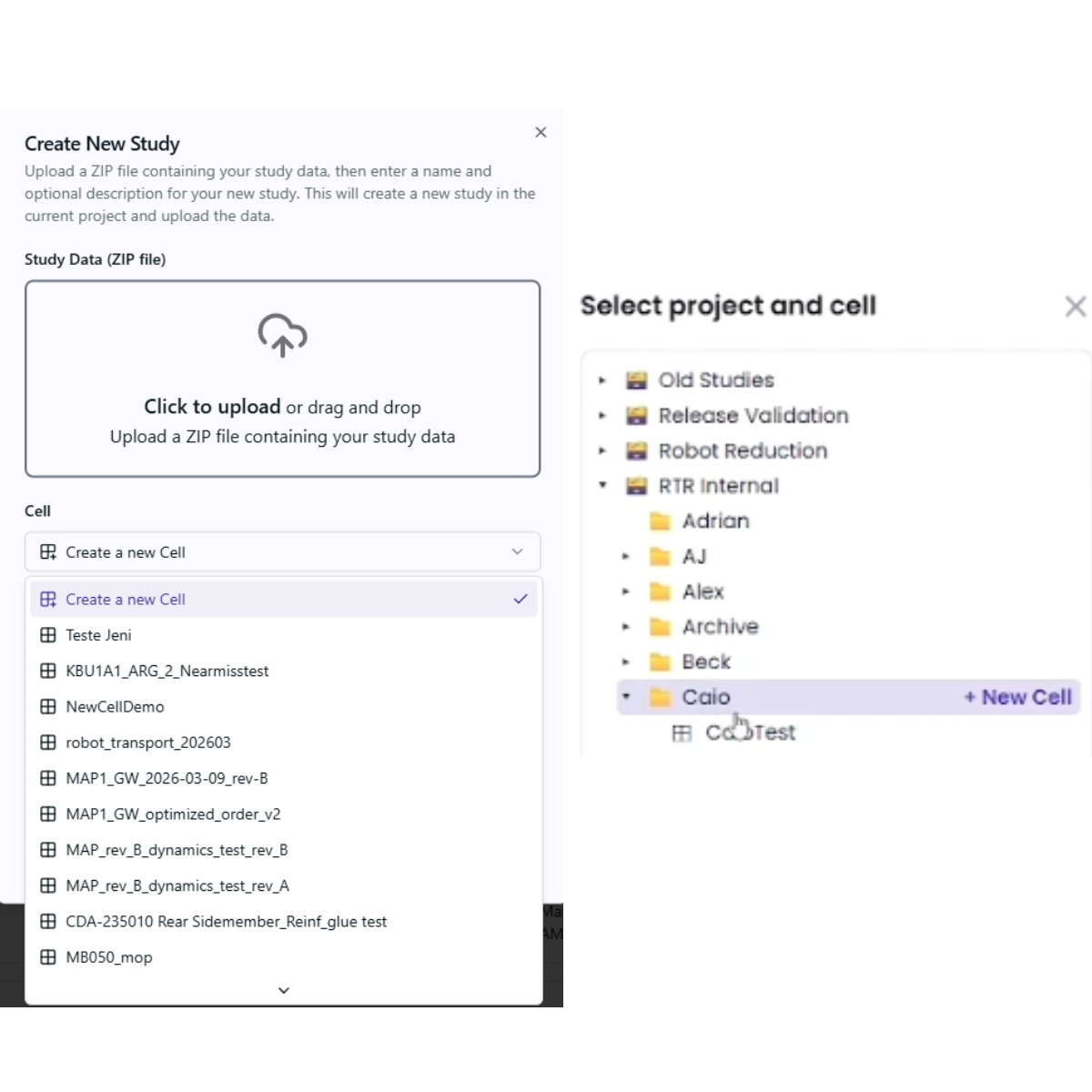
- NEW: Work Cell Containers for Studies
- In this release of Resolver, we introduced the concept of "Cell" containers in the platform folder structure.
- Cells are special folders that can only contain studies, and regular folders can now only contain cells or other folders.
- This means that every time users upload a study, they must select or create a cell.
- In the platform, users can create or select a cell when they select "New Study" and create a new cell by selecting "New Cell" in the "Project" dropdown.
- In both connectors, users can create or select a cell using the same workflow to select a project to upload to. To create a new cell, users can create them at the project level by selecting "+New Cell."
- NEW: Breadcrumb Navigation
- Users will now see a breadcrumb navigation at the top of their screen showing the path of what they are currently viewing.
- The breadcrumb can be used to navigate back to previous steps in a user workflow.

- Improved: Unconstrained Query Performance
- Target order, robot allocation, and configuration optimization has been improved leading to quicker convergence of these runs.
- Improved: Target Order Algorithm
- Target order computation changed to task-space (cartesian) sequencing instead of joint-space sequencing to better align with common use cases from customers.
- Improved: Material Thickness in "Allow Flips"
- When using the "Allow Flips" feature in Configuration selection, material thickness will now be taken into account.
All Connectors
Import local files from zip and enhanced warnings and error pop ups
- Improved: User Experience
- Users can now import files from a local source as a zip file, rather than having to unzip and select which file to import.
- The Import tab at the top of the viewer will now always be at the top of the window, but when users are in online mode, they should still import results using the Resolver tab.
- The smoothing table in the import tab will now be collapsed by default.
- The status text box at the bottom of the viewer was removed. Users can view status in the progress bar and will receive a toast notification for local export success.
- Improved: Performance and Responsiveness
- When users are switching between tabs in the viewer, the response time to view a new tab is improved.
- Project parsing and file creation upon export was updated, meaning faster export.
- When users are exporting to the Cloud with a local copy, the speed in creating the local file is improved.
- Improved: Notifications and Errors
- Users will notice that export/import success will come through as toast notifications, allowing users to continue their workflow and avoid freezing or disruptions.
- Error messages will now include context-specific documentation links to bring users to the exact documentation and help pages they need to resolve the error.
Process Simulate Connector 1.18.1
Exporting unreachable targets, bug fixes and improving spline motions
- NEW: Option to Export Unreachable Targets as Unassigned
- There is a new checkbox to export unreachable targets as unassigned.
- What does this mean? If a robot is not able to reach a target, exporting it as unassigned means that if another robot can reach it, it will be reassigned as part of that robot's tasks.
- Improved: Spline Motions
- Subtask points in spline operations now include smoothing values.
- Circular spline motion support is improved by using tool orientation for interpolation.
Visual Components and Gemini Connectors 1.16.0
Error message improvements and bug fixes
- Improved: Error Messages
- Error messages are improved when making a connection to Resolver and modifying states in parallel.
- Improved: Bug Fixes
- Study names can now contain the word 'Sequence' or other keywords that may have been involved in parsing results.
- Duplicated links are now considered in self collision checking.