2026.04.13 Release
· 4 min read
Now Available: Resolver 2026.04.13
We are excited to share Resolver 2026.04.13 with you! Read on to learn more about what to expect in this release.
Resolver 2026.04.13 is enabled by our latest connectors:
- Process Simulate Connector 1.19.0
- Visual Components Connector 1.16.2
- MELSOFT Gemini Connector 1.16.2
Compatibility information for supported simulation tools and versions can be found on the minimum requirements page of the Resolver documentation site. We recommend always downloading the latest version of the Resolver Connectors, regardless of the version of the simulation tool you are using.
Release Highlights
Improved performance and SD/ED Optimization
- Improved: CAD Export Speed
- We significantly improved overall export speed through changes in our CAD Export process.
- From internal testing, exports are 9–10x faster on average.
- Users exporting locally will notice a reduction in exported file size.
- Users can now export everything needed to run Resolver without the previous wait times.
- Improved: Engine Performance
- Users will see roughly 10x faster convergence for unconstrained queries, including target order optimization, optimize Rz, and robot allocation.
- Based on feedback from beta testing, we relaxed the criteria for clearance violations in stitch welding applications to reduce the number of vias generated between close welds.
- Users can now enable proper SD/ED optimization with "Optimize Rz."
- We resolved a critical bug in motion collision checking that caused the engine to become stuck on a solution. If you experienced this issue, please re-run with this new release.
- NEW: Optimization of SD/ED Values for FANUC Robots
- Users can now opt for Resolver to optimize the vias at the SD/ED points for FANUC robots.
- To use this feature, please ensure that a distance schedule is set up within the FANUC Controller in Process Simulate. The engine will select an index from the distance schedule for the SD/ED values.
- When the SD and ED fields are left blank for a weld target, Resolver will choose the best order to execute each target, including the SD/ED vias that the engine will define using the distance schedule.
- Note: This update is only relevant for users working in Process Simulate with FANUC Robots.
- NEW: Clearance Violation in Reachability Results
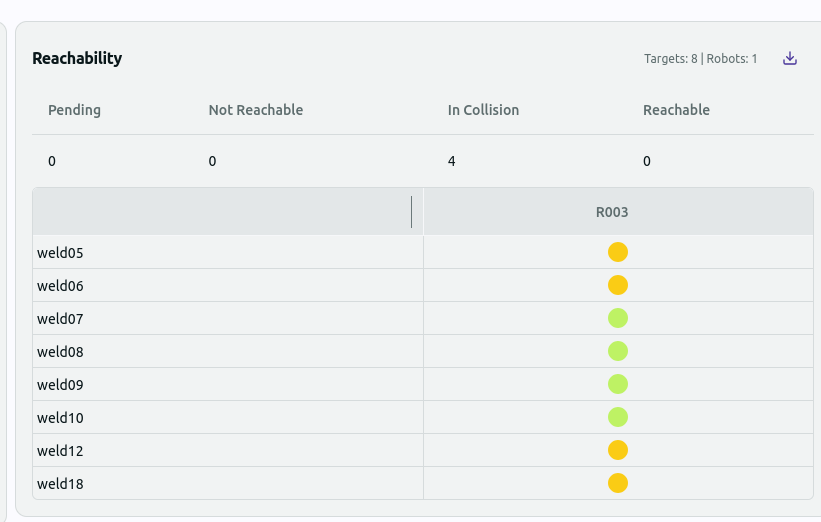
- There is a new value in the Reachability Results called "Clearance Violation."
- Clearance Violations will show in the Reachability Results when a target is reachable but violates the clearance value set, indicating what would be called a "Near Miss" in Process Simulate.
- Clearance Violations will appear as a lime green circle in the Reachability Table in the run results.
All Connectors
Improved user experience and UI interaction
- Improved: UI Indicators
- Users can now minimize the progress bar when it is blocking UI elements.
- Users will now notice a spinner in the Resolver tab of the connector viewer when the page is loading.
- Fixed: Button Text
- Buttons that may have been missing text in the previous release should now have the proper labels.
Process Simulate Connector 1.19.0
Saved preferences and improved error detection
- Improved: Sanity checks to detect modeling errors during export
- Users will now receive better and more accurate notifications for modeling errors that include:
- Joints that don't have parent and child links
- OLP commands modifying state of another robot
- OLP commands referencing invalid device
- Users will now receive better and more accurate notifications for modeling errors that include:
- Improved: Changes to importer values retained
- When a user changes values in the conversion and approach tables, they will be retained until importing a new result or opening a new study.
Visual Components and Gemini Connectors 1.16.2
Improved warnings and notifications
- Improved: Warnings about state modifications and unsupported cables
- Users will now get an error preventing a target from modifying the state of another robot.
- When users include unsupported cables in a study, they will get a warning to accept before proceeding with export.
- Improved: Success notifications
- Export and import success popups will now appear as toast notifications, to keep from disrupting users in their workflow.