2026.06.11 Release
· ca. 3 Min.
Now Available: Resolver 2026.06.11
Resolver 2026.06.11 is here! Read on to learn more about what to expect in this release.
Resolver 2026.06.11 is enabled by our latest connectors:
- Process Simulate Connector 1.22.0
- Visual Components Connector 1.18.1
- MELSOFT Gemini Connector 1.18.1
Compatibility information for supported simulation tools and versions can be found on the minimum requirements page of the Resolver documentation site. We recommend always downloading the latest version of the Resolver Connectors, regardless of the version of the simulation tool you are using.
Release Highlights
Import without operation lookup, pedestal servo welding support, shoulder/elbow flipping prevention, and a new Advanced Settings menu
- NEW: Import results without exported operation lookup
- New exports can now have results imported to Process Simulate without reliance on original operation lookup.
- NEW: Pedestal/stationary servo welding support
- Resolver now supports pedestal welding applications when the external gun is servo driven.
- Resolver will optimize the material handling motion and servo gun values.
- NEW: Added engine rules to prevent shoulder/elbow flipping
- As a result of customer feedback, the engine has added a feature that will strongly bias results to prevent robot shoulder/elbow flipping in the path unless it is absolutely necessary to solve the problem. This should help prevent potential downstream issues that are not well defined to the Resolver input.
- NEW: Advanced Settings menu in the connector
- The configuration options that were previously in the main connector are now in a new "Advanced Settings" menu in the options of all connectors.
- Users can set their configurations for export and import using this menu once and those selections will be persistent for the user every time they use the connector.
- Navigate to this new settings option by clicking the gear icon in the top right corner of the Viewer and selecting "Settings." The new dialog has three tabs: General, Export, and Import where users can make selections.
- For Process Simulate users, the advanced settings will also now include dynamics calibration cache management.
- A number of these settings will now be enabled by default based on user feedback.
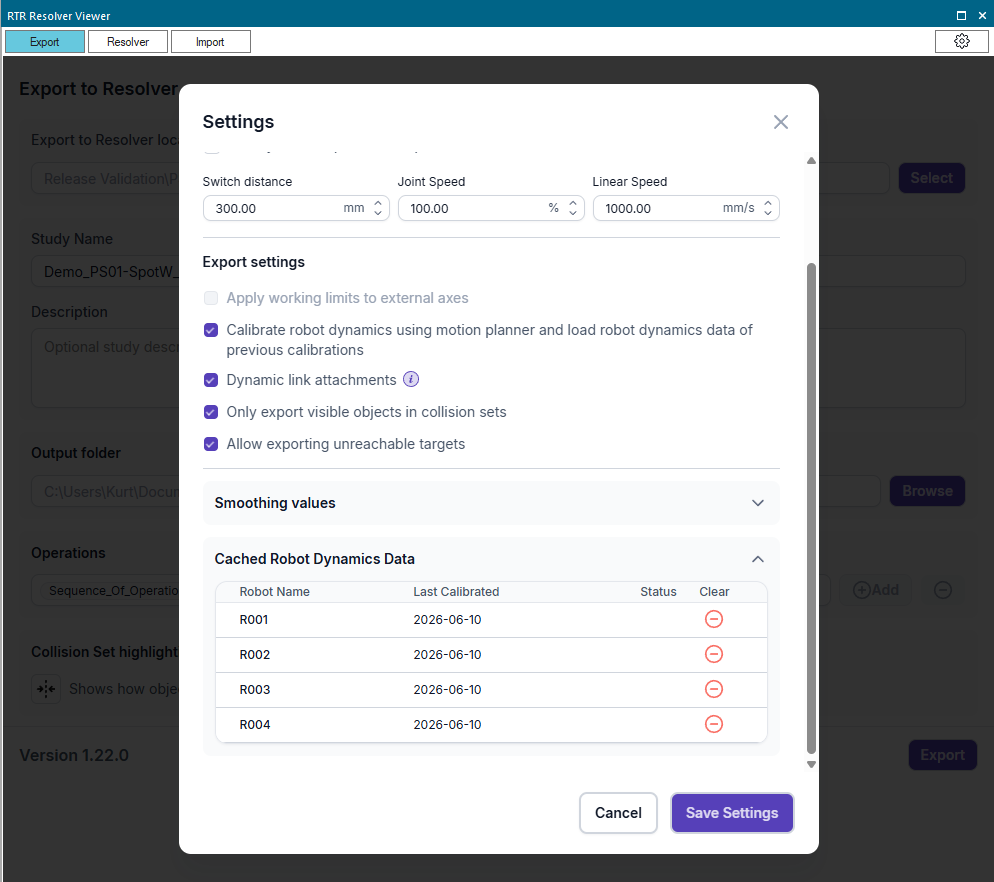
All Connectors
UI/UX enhancements
- Improved: UI/UX updates
- The progress bar indication now more accurately reflects real performance.
- The font on all pages in the connector was updated.
Process Simulate Connector 1.22.0
PS 2512 support and FANUC behavior improvements
- NEW: PS 2512 is now supported.
- Improved: FANUC robot SD/ED behavior
- FANUC controllers without SD/ED will have preserved approach/retreat vias upon import.
- Cycle time and trajectory estimation for FANUC SD/ED motions are improved.
- Improved: Workflow improvements
- Import will now only accept zip files.
- Added various sanity checks for query validation to catch errors earlier.
Visual Components and Gemini Connectors 1.18.1
Support for new versions and workflow improvements
- NEW: Support for VC 4.10.2 and Gemini 1.410.01011
- VC 4.10.1 and Gemini 1.410.00910 remain supported.
- Users who previously tried to use the RTR connector with VC 4.10.2 or Gemini 1.410.01011 will need to reinstall VC/Gemini.
- Users on VC 4.9, VC 4.10.1, or Gemini 1.410.00910 can update the connector as usual.
- Improved: Workflow improvements
- Users will be prevented from exporting when the Collision Detectors editor is open.
- There is now a button to highlight objects in collision detectors.
- The RTR connector will be automatically added to the ribbon in the "Program" tab.
- Users will be warned when Selection vs World collision detector is enabled during export.