Report Feedback to Support
Report Feedback to Support
The Report Feedback to Support dialog sends a report straight to the RTR support team from inside Resolver. Use it when a RunAn instance of a study and query computed by the Engine and generates motion paths, interlocks, and/or robot task allocation and ordering. Multiple runs can be executed in parallel by using multiple a... fails, when results do not look the way you expect, or when you want to tell us something about the product. You can attach the project and study data with the report, which saves the back and forth of sending files separately.
Open the dialog
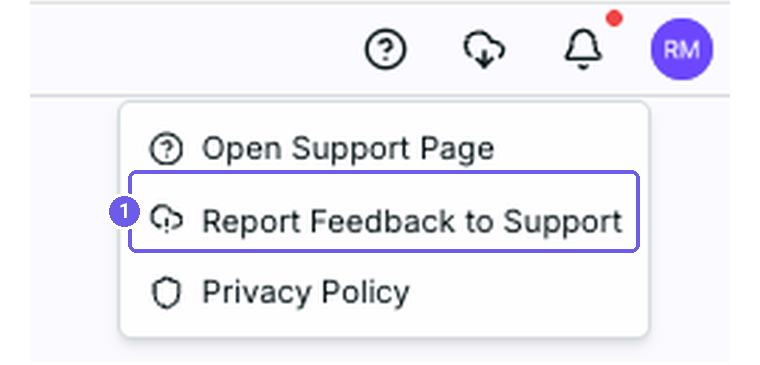
Open the Help menu in the top right corner of the page and select Report Feedback to Support.
What to fill in
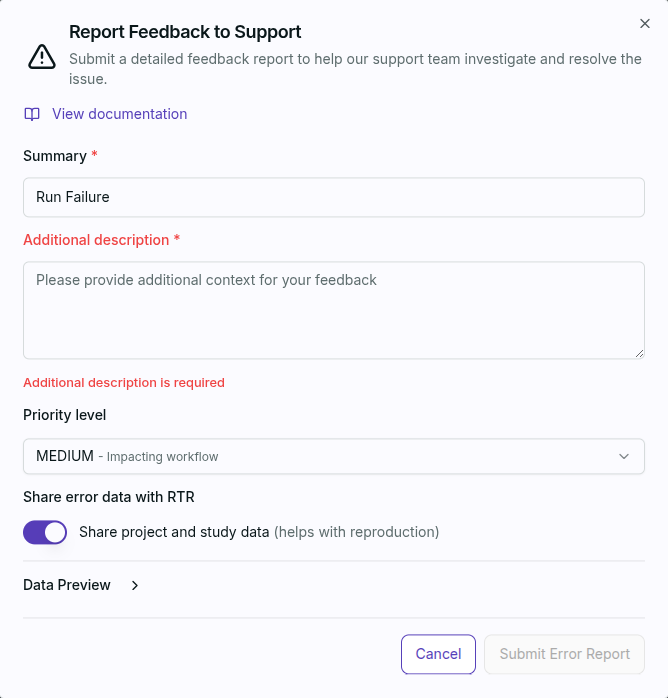
- Summary (required): one line naming what happened, for example "Run Failure".
- Additional description (required): what you were doing, what you expected, and what you saw instead.
- Priority level: how much the issue is holding you up.
- Share error data with RTR: leave Share project and study data on so the support team can reproduce the problem with your data. Use Data Preview to see what is included before you send it.
Click Submit Error Report to send the report.
The upload is limited to 2GB.
If you have emailed our support box directly in the past, submitting may fail. Making your email address public in Jira Service Desk resolves this. Resubmit the report afterwards.
Include the Study ID
StudyA collection of one or more robots, targets, and obstacles used for path planning and interlock generation. Studies are exported from a Simulation tool using a Connector and uploaded to Resolver. names are not unique, so a name alone does not tell support which Study you mean. Open the Study info popup and use the copy button next to the Study ID to grab the exact identifier, then include it in your report or email.
Suggestions and Feature Requests
Report Feedback to Support is for something that is not working. If instead you want to suggest a change to the product, submit a suggestion and it is routed to the product and design teams.
Related
- Navigate Projects for where the Help menu sits on the page.
- Process Simulate troubleshooting
- Resolver platform troubleshooting