Unsupported Cables
Platform: Process Simulate
Resolver flags TxCable (and similar) devices during export. That cable type is not supported: cable geometry is never written into the Resolver study, even when Export dynamic link attachments is on in the Resolver exporter. Enabling that option affects other dynamic attachments; it does not make TxCable exportable.
Dialog shown in Resolver
These cables are not of supported type and will be excluded from export.
What you can do in this dialog
- Can you continue export? Yes
- Buttons in the popup: OK
- What happens next: Acknowledging the message lets you proceed with the export.
- Next step: See impact if you continue
If the message seems to appear or disappear unexpectedly, Do not show this again may have been selected earlier.
Reloading the study (or opening a new one) is a practical way to confirm whether the warning still applies.
Impact if you continue
You can usually continue when:
- cables are not collision-critical for the analyzed motion,
- you are running early-stage validation,
- you accept that cable physics and geometry are not included in the Resolver export.
For production decisions with tight cable clearance, validate cable behavior separately in Process Simulate.
How to fix it
TxCable is not supported in this export path, and there is no Resolver option to include it.
Effect in Resolver engine
When TxCable is excluded, cable geometry is not loaded into the Resolver engine for this export. The study may show empty space where cables exist in Process Simulate.
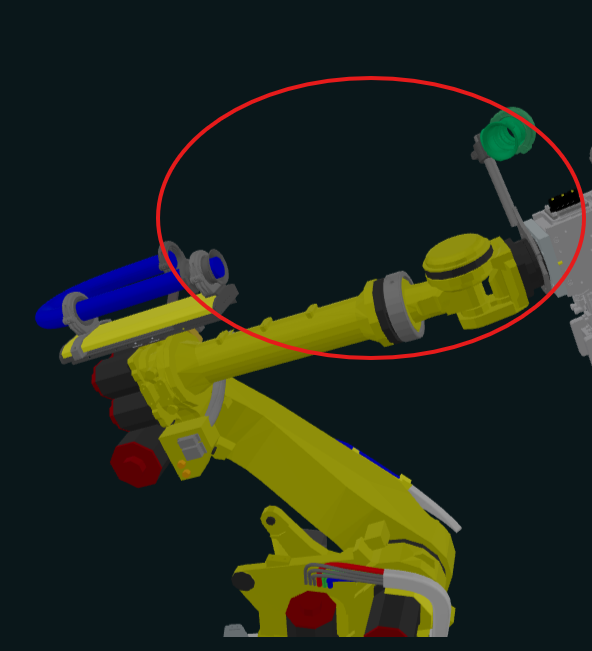
The highlighted area in the illustration shows the cable region missing in the engine representation.