Resolver Platform Troubleshooting
This section covers warnings and errors shown in Resolver Platform notifications.
Use this section when the issue appears in Resolver UI and is not specific to a connector import/export flow.
How to use this section
- Identify whether the message is a warning or an error.
- Find the matching message title below.
- Follow the page guidance and retry.
- If the issue persists, submit a support ticket with logs attached. Report Feedback to Support sends the report from inside Resolver and can attach your project and study data.
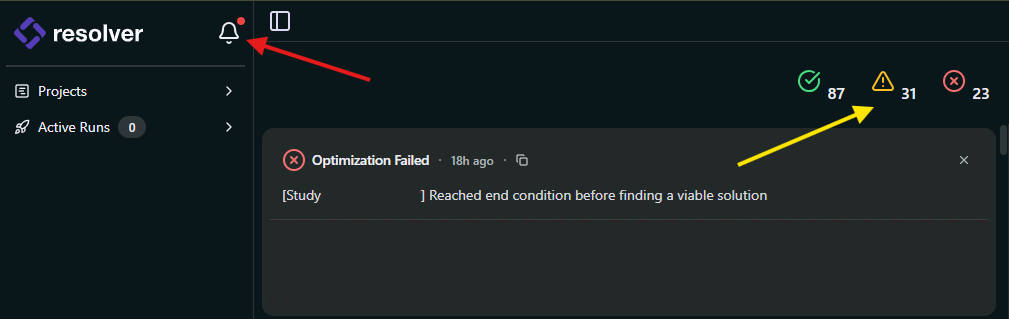
In the screenshot above:
- Red arrow: notification bell icon that opens the Notifications panel.
- Yellow arrow: severity filters that control what is shown in the panel (notifications, warnings, errors, or all at once).
The panel opens as a sheet over the page you are on. Close it and you return to that page.
note
Screenshot taken before the 2026.09.21 release. The bell icon and the severity filters work as described, but the panel now opens over the page instead of on a page of its own. See Navigate Projects for the current layout.
Engine warnings on platform
Engine errors on platform
- Reached end condition before finding a viable solution
- Failed to plan the following Target-Target connections
- Failed to plan connection between the start target and goal target
- The following Targets could not be reached by any of the Robots
- Failed to create at least one task for the following targets
Platform and connection issues
- Failed to update results
- Agent stopped responding
- Failed to start optimization
- Validation failed to start
- Project upload failed
- Study upload failed
- Failed to Upload Study