Resolver Platform のトラブルシューティング
このセクションでは、 Resolver Platform の通知に表示される警告およびエラーについて説明します。
問題が Resolver の UI に表示され、 Connector のインポート / エクスポートフローに固有のものではない場合に、このセクションをご利用ください。
このセクションの使い方
- メッセージが警告かエラーかを確認します。
- 下記から該当するメッセージタイトルを探します。
- 各ページのガイダンスに従い、再試行します。
- 問題が解消しない場合は、ログを添付してサポートチケットを送信してください。
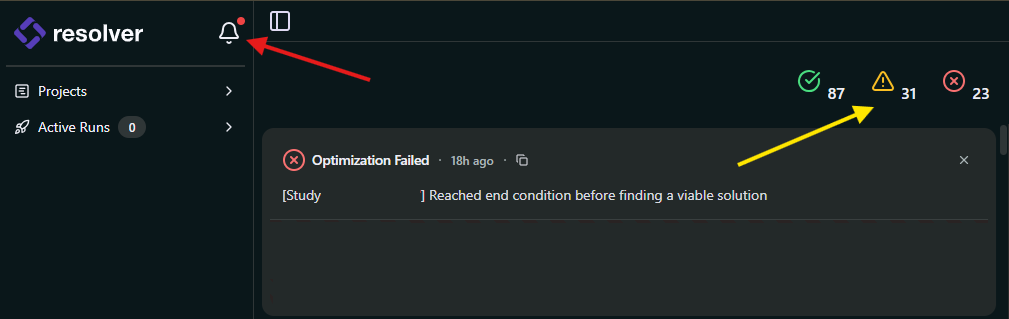
上記のスクリーンショットについて:
- 赤い矢印: 通知パネルを開く通知ベルアイコンです。
- 黄色い矢印: パネルに表示する内容(通知、警告、エラー、またはすべて)を切り替える重大度フィルターです。 The panel opens as a sheet over the page you are on. Close it and you return to that page.
注記
Screenshot taken before the 2026.09.21 release. The bell icon and the severity filters work as described, but the panel now opens over the page instead of on a page of its own. See Navigate Projects for the current layout.
Platform 上の Engine 警告
Platform 上の Engine エラー
- Reached end condition before finding a viable solution
- Failed to plan the following Target-Target connections
- Failed to plan connection between the start target and goal target
- The following Targets could not be reached by any of the Robots
- Failed to create at least one task for the following targets
Platform および接続の問題
- Failed to update results
- Agent stopped responding
- Failed to start optimization
- Validation failed to start
- Project upload failed
- Study upload failed
- Failed to Upload Study